![mia-logo-1.svg]](https://miahealth.no/hubfs/mia-logo-1.svg)
To log in to Mia Insight as an administrator, manager, or contributor, the process remains consistent regardless if your affiliation is with a company, clinic, occupational health service, medical center, or as an individual practitioner.
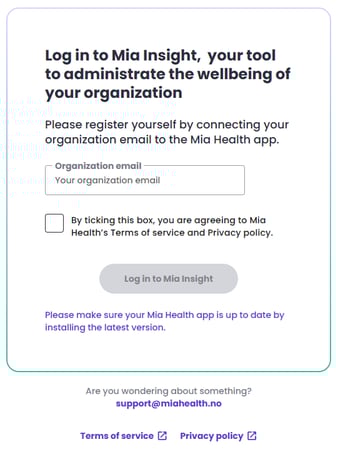
On a PC, Mac or tablet, access your web browser and navigate to the website: insight.miahealth.no.
Enter the email address associated with your registration (Note: This may differ from your personal Mia Health app user email), check the box to acknowledge acceptance of the privacy policy and terms, and click the "Log in to Mia Insight" button.
Please note: It is imperative that your mobile phone with the Mia Health app is readily available during the login process.
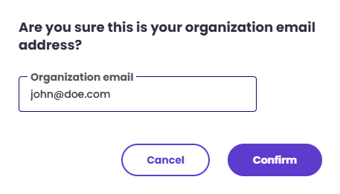
A prompt will appear to verify the accuracy of your email address. Kindly confirm this information before selecting "Confirm".
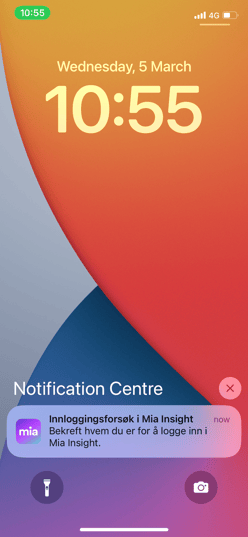
Upon confirming your email address, access your mobile phone and tap the notification from the Mia Health app. (Note: If notifications are disabled, you will need to manually open the app and tap the "bell" icon located in the top right corner.)
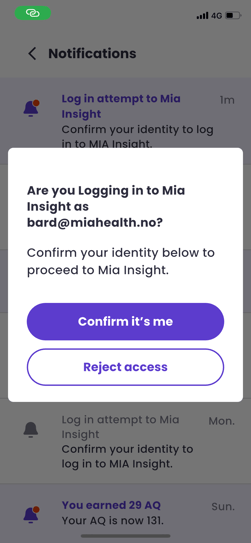
The app will launch, presenting a verification prompt to confirm your identity and intention to log in to Mia Insight. Select "Confirm it's me" and you will be automatically logged in to Mia Insight, allowing you to return to your web browser.
If you didn't find the answer to your question, feel free to contact our user support.