![mia-logo-1.svg]](https://miahealth.no/hubfs/mia-logo-1.svg)
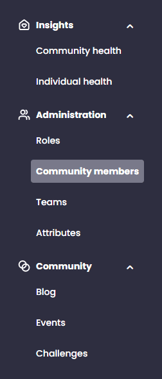
When you are logged into Mia Insight, it is easy to manage and add new members. By clicking on "Community Members" under "Administration", you will be able to add and send invitations to new members.
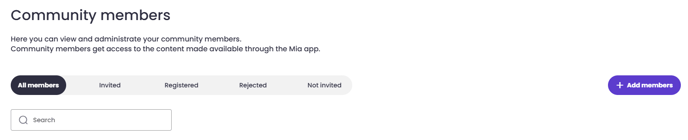
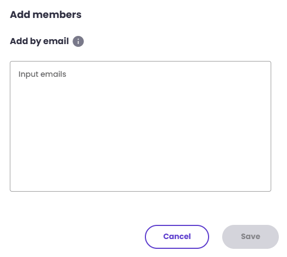
By pressing the '+ Add members' button on the right side of the screen, a box will appear where you can easily paste one or multiple email addresses. Please note that you must separate email adresses with a comma or line break.
Once you have entered all the email addresses, click on "Save", and the new members will be added to Mia Insight, without an invite being sent.
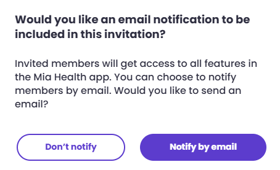
When you are ready for all members to start using the system and connect to Mia Insight, you click on the "Invite" button next to the individual member's name. You will then have the option to notify the member with a separate email via "Notify by email" or choose "Don't notify."
Please note! If you are conducting a group onboarding with multiple members simultaneously, it is advantageous not to notify them, but to get everyone in at the same time via the website join.miahealth.no.

You can also choose to send invitations to multiple members at once. You can do this by selecting individual members or marking all members and pressing "Send Invitation."

When members are invited, they will be marked as "Invited" next to their names.

Once they have accepted the connection, they will receive the status of "Registered."
Here you can read more about how a user approves the connection to your organization.

If a member does not accept the invitation, they will be marked as "Rejected." They will also receive this designation if the invitation is not accepted within 7 days.

You will also see whether the member has accepted to share data with Mia Insight, indicated by the statuses "Sharing" or "Not Sharing." All members can change and manage data sharing at any time within the Mia Health app.

Please note! If members do not share data with Mia Insight, their data will not be presented in "Community Health." It is also important to emphasize that with a business account, only anonymous health data is shared, and no one can see the individual data of members. Individual data can only be shared in connection with practitioners and healers.
Here you can read more about how a user approves the connection to your organization.
If you did not receive an answer to your inquiry, please feel free to contact our customer support.